
Meet Droip — The No-Code Website Builder for WordPress
No-code builders like Webflow, Framer and Wix changed the way people design sites. They give you visual freedom, clean layout control and the ability to build without touching code.
The problem is… none of them run on WordPress.
Droip steps into that gap. It brings the no-code experience you get in modern visual platforms but keeps everything inside WordPress. No SaaS lock-in, no external hosting, no monthly per-site fees. You get full design freedom while still owning your site and data.
Here’s a full look at how it performs.
What Makes Droip Different
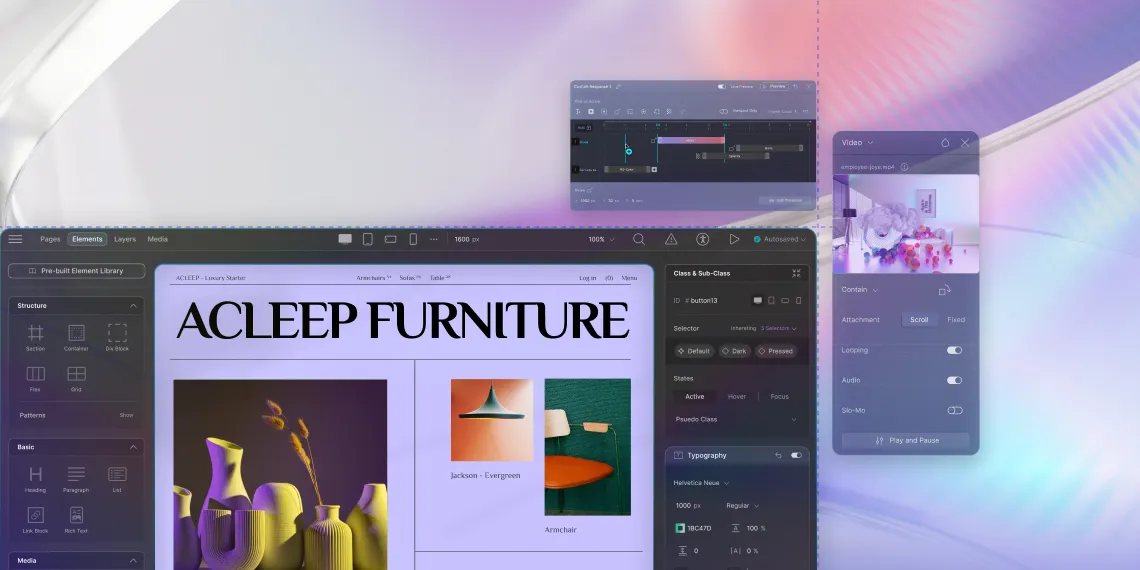
Droip doesn’t behave like a typical WordPress builder. It avoids the old row-column mindset and gives you a free-form design canvas. If you’ve ever used Webflow or Framer, this instantly feels familiar.
You can drag, place, layer and customize elements with real control. It feels closer to modern design software than the traditional block and widget system WordPress users are used to.
This is great for beginners who want visual freedom and for developers who want cleaner structure without the usual bloat.
What Droip Gets Right
Visual freedom similar to Webflow or Framer
You’re not locked into rigid layouts. You can create complex designs, responsive grids, interactions and layered sections without code.
The entire workflow feels modern, light and creative.
Clean and semantic code output
Droip generates cleaner HTML compared to most visual builders. Less wrapper stacking and more purposeful markup.
Good for SEO. Good for speed. And great for developers who hate messy code.
Built-in dynamic content
Droip includes its own Content Manager, which lets you create dynamic collections and templates without plugins.
Think of it like Webflow CMS but inside WordPress.
This means fewer dependencies and easier management.
Smooth animations and interactions
You get properly built interaction controls that don’t require custom JS or third-party addons.
Slide, fade, transform, reveal… all the usual stuff, but cleaner and more integrated.
Beginner-friendly but still powerful for devs
If you don’t code, you can build just fine. If you do code, you can fine-tune your designs or extend them however you want.
It doesn’t block advanced users, which is rare in no-code tools.
A Few Things You Should Know
There’s a learning curve
Because Droip behaves more like Webflow than Elementor, it takes a bit of time to adjust if you’re coming from traditional WordPress builders.
The CMS workflow is a little different
Droip’s content manager doesn’t mimic the classic WordPress post-type UI.
It works well but feels new, especially if you’re deeply used to the WordPress admin structure.
As with any no-code builder, some lock-in
If you switch to another system later, you’ll need to rebuild your layouts.
That’s the trade-off with every no-code builder, not just Droip.
Who Should Use Droip
Droip feels perfect for:
- Users who love Webflow or Framer but need the power and ownership of WordPress
- Freelancers and agencies building clean, modern websites without writing code
- Developers who want no-code speed without sacrificing code quality
- Content-rich websites that need dynamic collections
- Designers who want visual freedom inside WordPress rather than limited theme options
It’s for anyone who wants a Webflow-style workflow but doesn’t want to leave the WordPress ecosystem.
Final Thoughts
Droip brings the modern no-code experience to WordPress in a way that feels natural. You get visual freedom, cleaner code and dynamic content features without relying on fifteen plugins.
It has a small learning curve, but once you get the flow, it’s fast and satisfying to build with.
If you’ve ever wished Webflow or Framer had a WordPress version, Droip is probably the closest you’ll get, and it’s already pretty solid.
If you want, I can also write a version targeting beginners or a developer-deep-dive comparing Droip’s output to classic builders.
Ready to Try Droip?
If you want to build modern, clean and fully custom websites visually inside WordPress, give Droip a try today.
